




In an hour-long training recording, the presenter says the permitted limit is 15%, while the slide behind them shows 12%. An editor with only the transcript misses the conflict. From still images alone, the same editor may miss the presenter’s later correction. Gemini 4 Neon can take the recording alongside the course documents and flag moments for review. That changes how the team works before any leaderboard score enters the discussion.
Google DeepMind announced Gemini 4 Neon on November 18, 2026. It targets multi-step work, from interpreting mixed media to changing code in real repositories. Published results show distinct trade-offs. Neon scored above Carbon on Cognition’s coding benchmark, while Claude Fable still led both. Within Neon, moving from high to xhigh gained one rounded point on the Artificial Analysis index, alongside a much larger increase in cost per task.
Google DeepMind launch announcement · Cognition leaderboard and methodology · Artificial Analysis model measurements
In brief. Neon has a unified 1,048,576-token context window. It accepts video, audio, images, text and documents and returns text. Standard API pricing is $3 for input and $15 for output per million tokens. Its strongest case is work that depends on what was said and shown together, or coding tasks that take several steps to complete.
Gemini 4 Neon at a glance
Specification | API support |
|---|---|
Stable model ID |
|
Unified context window | 1,048,576 |
Default synchronous output limit | 65,536 |
Long-decode output | Up to 1,048,576, subject to mode and request capacity |
Inputs | Text, images, audio, video and documents |
Native output | Text, including schema-based structured output |
Thinking levels | low · medium · high · xhigh |
Processing options | Standard · Batch · Flex · Priority |
Caching | Implicit only |
The unified window is shared by input and output. When sources or conversation history occupy much of it, less room remains for the response. The default synchronous output limit is also separate from the long-decode ceiling. If a project depends on dozens of outputs, test the length you need and how you will retrieve it before budgeting around the million-token figure. Measure retrieval accuracy separately on your own documents.
Gemini 4 Neon model specifications · Long decode guide
When does long decode make sense?
Long decode generates a response in successive chunks. Google documents background execution or client-side continuation in the Interactions API when the output budget exceeds 65,536 tokens. Each chunk continues from earlier output within the context limit. A product waiting for a single large file needs to track request status, know when the file is ready to retrieve and handle a dropped connection or incomplete output.
Token costs accumulate across chunks, including chunks containing only reasoning. Independent sections can be easier to review and cheaper for some reporting projects. Split an executive summary from a list of exceptions and a spreadsheet appendix, then reconcile them in a review step. Use long decode when the work needs consistency across a long answer and a trial shows that continuity reduces revisions.
Google’s long-decode documentation
What Neon changes in practice
Understanding recordings with audio and video
You can attach a video and ask about an event or a slide. Google documents an agentic video mode, while the model card lists static processing as the default. Begin with a question about a specific event or clip. For each finding, ask for a timestamp, what the audio says and what is visible on screen. Those separate fields make it easier to catch confusions between slides or cases where on-screen text was attributed to the speaker.
In the percentage example, ask for the moment the conflict occurs and the moment it is resolved. If an old screenshot reappears later, record where each reference came from. Flag contradictory clips for a human editor and present the remainder as a navigable index. Reviewers can then check individual entries against the recording.
Tools and structured data
Neon supports function calling, structured output, file search, code execution, Google Search and Maps grounding, and computer use. The right tools depend on the deliverable. Extracting fields from a recording may only need a JSON schema. Checking a current claim needs fresh sources. Reconciling a spreadsheet may require calculations and subtotal checks. Record which tool was used at each step and retain the source for claims a reviewer needs to check.
Gemini 4 Neon model specifications · Video understanding guide
Running coding agents in Antigravity
Google’s launch described Neon coordinating Hydrogen subagents in Antigravity. That lets several agents contribute to one project. A team could assign one agent to inspect UI tests and another to review configuration, then have the coordinator reconcile the findings and identify affected files. Keep experiments independent where practical and consolidate changes at a single review step. If two agents write to the same file, reconciliation can cost more time than parallel work saved.
Google also demonstrated an in-browser skiing simulation, an interactive 3D reconstruction of Alan Turing’s room and a spreadsheet that rendered an image through formulas. These demonstrations show what the model can produce when paired with specialized tools. For a user interface, define acceptance before the trial. Test mobile layout, keyboard access, load time and whether the team can update the display data without rewriting the application.
Google’s launch demonstrations
Gemini 4 Neon pricing in US dollars and Saudi riyals
Rates below are per million tokens. Saudi riyal equivalents use SAR 3.75 per US dollar and exclude taxes and tool charges. Billed output includes thinking tokens. Neon requires the paid Gemini API tier. Access in the Gemini app is tied to the user’s plan.
Tier or charge | Input USD / SAR | Output USD / SAR | Cached input USD / SAR |
|---|---|---|---|
Standard | 3 / 11.25 | 15 / 56.25 | 0.15 / 0.56 |
Batch | 1.50 / 5.63 | 7.50 / 28.13 | 0.075 / 0.28 |
Flex | 1.50 / 5.63 | 7.50 / 28.13 | 0.075 / 0.28 |
Priority | 5.40 / 20.25 | 27 / 101.25 | 0.27 / 1.01 |
A worked example for 1,000 requests
Assume each request uses 20,000 input tokens and 2,000 billed output tokens, with no cache reuse or search. Standard input costs $0.06 and output $0.03. That is $90 per thousand requests. If a workflow repeatedly regenerates the same file, multiply by the actual attempt count and add the time spent editing.
Tier | USD per 1,000 | SAR per 1,000 |
|---|---|---|
Batch / Flex | 45 | 168.75 |
Standard | 90 | 337.50 |
Priority | 162 | 607.50 |
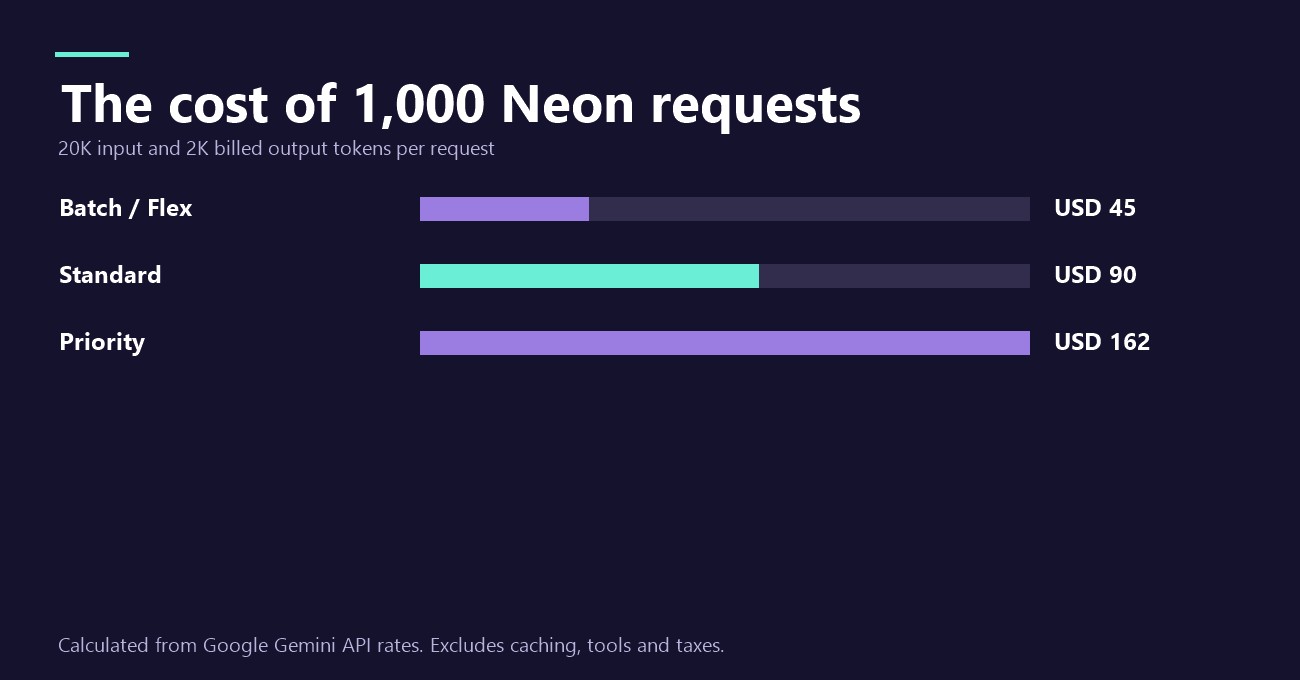
Neon’s published rates applied to 1,000 hypothetical requests.
Caching and search charges
Implicitly cached Standard input is $0.15 per million tokens, or 5% of the normal input rate. For repeated questions about one handbook, put the shared material first and the individual question last, then inspect usage to see what was reused. The model card specifies implicit caching only. Google Search may issue multiple searches for one user request, so track actual queries when estimating tool costs.
Official Gemini API pricing · Saudi Central Bank exchange rates
Reasoning levels and when extra effort pays
Neon supports four reasoning levels. The table pairs each Artificial Analysis score with its per-task cost in that benchmark suite. Time is an index-specific estimate that can change between measurements. A clear course title may be a good low-effort trial. Try medium or high for synthesizing several references. Reserve xhigh experiments for difficult cases where a lower setting fell short despite having the necessary sources.
Effort | Index score | USD per task | Minutes per task |
|---|---|---|---|
low | 44 | $0.75 | 3.7 |
medium | 55 | $1.90 | 8.3 |
high | 60 | $3.74 | 14.5 |
xhigh | 61 | $6.44 | 22.3 |
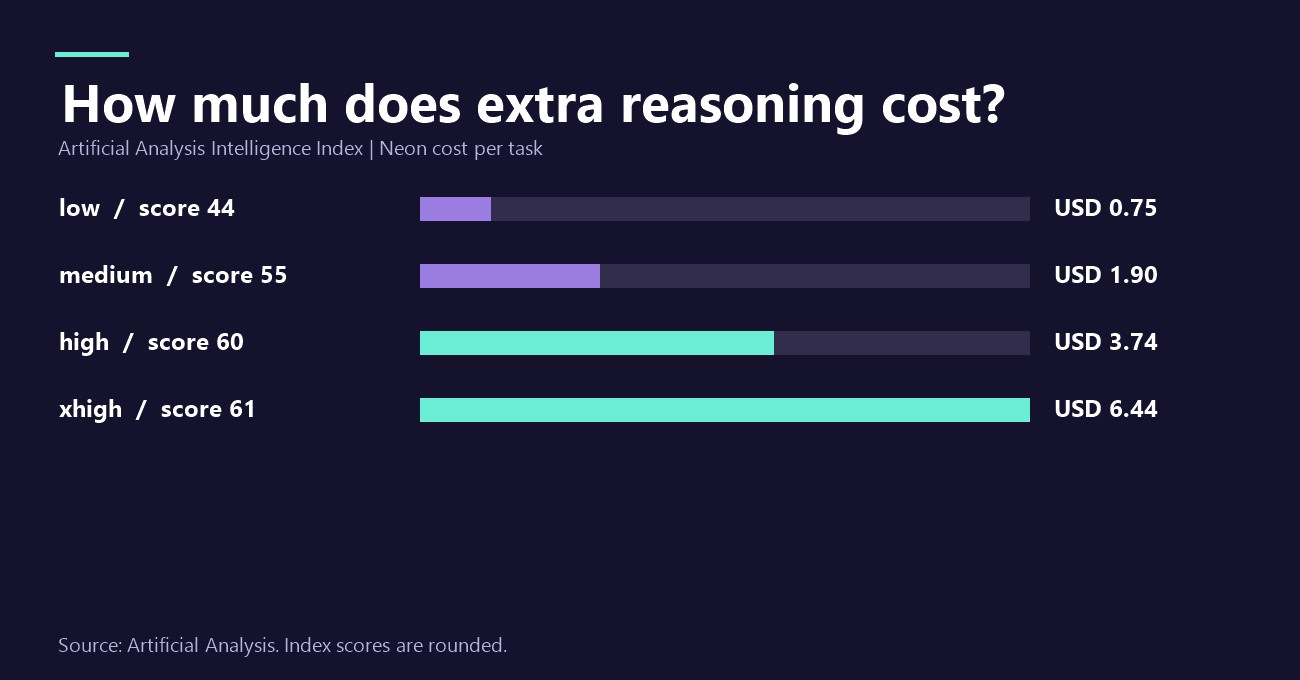
Rounded scores and task costs by effort on the Artificial Analysis index.
The index gains five points from medium to high and one from high to xhigh, with roughly 72% more cost for the latter step. A specific workload may respond differently. Run the same sample at each setting with an acceptance threshold, such as correct citations in 19 of 20 cases. Measure time from submission to approved delivery to capture review and retries.
Artificial Analysis model measurements · Independent launch analysis
Neon versus models from Google, OpenAI and Anthropic
Model | Base input / output USD | A workload worth testing |
|---|---|---|
Gemini 4 Hydrogen | $1.50 / $7.50 | Routine extraction and high-volume classification |
Gemini 4 Neon | $3 / $15 | Video plus documents, or multi-step coding |
Gemini 4 Carbon | $4 / $20 | Long technical project within Google’s stack |
GPT-6.2 Sol | $2 / $10 | Recurring text tasks and cost-sensitive coding |
GPT-6.2 Astra | $8 / $40 | Professional deliverable built from multiple sources |
Claude Fable 5.2 | $8 / $40 | Open-ended coding and architectural changes |
The Carbon row uses Google’s published rates from December 1, 2026. Google lists $2 and $10 through November 30, so a trial during that window has different economics. The OpenAI rows use base short-context prices, which can rise for long requests. Compare costs over the same billing period.
Gemini model pricing · OpenAI API model cards · Claude Fable 5.2 pricing
What do the coding results show?
Model | Harness | Score | Average rollout cost |
|---|---|---|---|
Claude Fable 5.2 · xhigh | Claude Code | 50.2% | $17.73 |
Claude Opus 5.5 · max | Claude Code | 47.3% | $12.82 |
Gemini 4 Neon · high | Antigravity CLI | 46.2% | $4.38 |
GPT-6.2 Astra · max | Codex | 44.2% | $5.97 |
GPT-6.2 Sol · max | Codex | 43.8% | $1.29 |
Gemini 4 Carbon · high | Antigravity CLI | 42.6% | $5.06 |
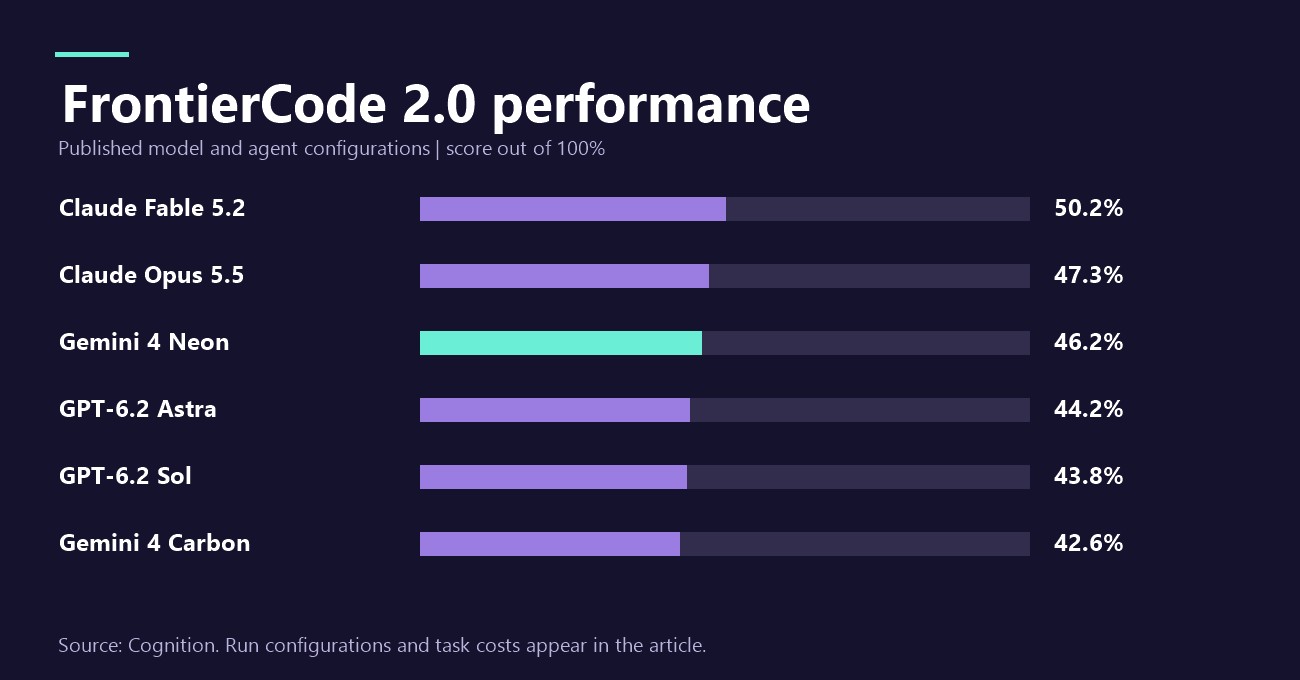
FrontierCode 2.0 results under Cognition’s published run configurations.
On FrontierCode 2.0, Neon was 3.6 points ahead of Carbon at high effort in Antigravity CLI, with a lower average rollout cost in the published comparison. Fable posted the highest score shown, at roughly four times Neon’s rollout cost. Sol scored 2.4 points below Neon and cost considerably less. Harness and effort affect every result, so record them when comparing against your repository.
For a team trial, choose a well-defined defect, a change spanning several files and a task with incomplete requirements. Give each model a fresh copy of the code and keep test commands and time limits fixed. Calculate the cost of changes that pass tests and earn review approval, including the cost of failed attempts.
Cognition leaderboard and methodology · Massaq’s guide to Astra and Sol · Massaq’s guide to Claude Fable
Comparing by workload
Benchmark | Published Neon result | What it tests |
|---|---|---|
Artificial Analysis Intelligence Index · xhigh | 61 | Aggregate coding, reasoning and knowledge work |
FrontierCode 2.0 · high | 46.2% | Repository changes against maintainer criteria |
Chartography | 73.5% | Reading dense charts, as reported by Google |
Agents’ Last Exam v1.1 | 75.8% | Multi-step professional work, as reported by Google |
Vals Index | 70.9% | A suite of professional evaluations, as reported by Google |
Rounded Artificial Analysis figures put Fable at 65, Astra at 62 and Neon at 61 around launch, with Sol at 57 in the releases view. A workload-specific ranking can differ, as FrontierCode shows. Compare versions and configurations before joining data. An Agents’ Last Exam v1.1 score belongs with its own setup and version.
Google DeepMind launch announcement · Independent launch analysis · Artificial Analysis release comparison · Cognition leaderboard and methodology
What do business benchmarks actually measure?
Google’s announcement reported 56.3% on Zapier’s AutomationBench and $16,843 on Vending-Bench 2, a simulation of operating a retail business over time. The dollar figure is the simulation’s outcome measure. On your workflow, compare models by completed transactions, the accuracy of the final record and the time staff spend resolving exceptions. Keep actions outside the application traceable and reviewable.
For science workloads, Google cited 70.5% on Terminal-Bench Science and 84% on RiemannBench. A team evaluating analytical work can turn that capability into a local test, such as reproducing an analysis from a spreadsheet and a note on its assumptions. A second reviewer should be able to reproduce the same value from the original rows and see which records were excluded and why.
Google’s reported business and science results
A practical pilot for a Saudi or Gulf team
Week one: prepare a reviewable sample
Collect 20 prior cases with verified outcomes. A sample might include five training recordings, five bilingual documents, five repository changes and five cases with missing documents or unreadable details. Record the source, reference timestamp or page and required output fields for each case. For the training sample, score timestamp accuracy, misattributed claims and time spent editing.
Week two: run two models under matched conditions
Test Neon at high effort on original recordings and compare a transcript-and-stills workflow with Sol or Astra. Count the preparation cost on both sides, including transcription and frame selection. For patterned text work, try Hydrogen next to Neon with the same sources. In Arabic tests, check product names, dates and figures. Preserve the original wording in a separate field when requesting translations.
What should move into production?
Area | Deliverable | Acceptance criterion |
|---|---|---|
Training | Bilingual video index | Accurate timestamps and source references |
Operations | Table reconciling field definitions across branches | Documented mismatches traceable to files |
Software | Change ready for test and review | Passing tests and acceptable cost per change |
Customer support | Fields extracted from recordings or notes | Correct names and measured reviewer time |
Start with a small log of attempts, costs and human intervention. If Neon meets your acceptance threshold on video indexing, estimate how many jobs actually start with video before routing more application traffic. If the data includes customer information, review what company policy allows in the service and its tools before assembling the test set.
Massaq’s artificial intelligence solutions cover integrating models into business workflows. For teams building bilingual training materials from recordings, see our education and training services.
Operational limits that show up in trials
A model can process a clip, but video sampling and poor audio can affect its timestamps. Small text that flashes briefly may be misread. Include rapid cuts, low-resolution screens and overlapping speakers in the sample. Ask the model to describe what it could read. Score event detection separately from whether the event was interpreted correctly.
When using search or third-party documents, treat their contents as source material. Define which records the agent can read and modify, then test how the system responds when a source is unavailable or usage reaches a limit. Long requests may return partial results. Show users which parts completed and which still need review.
Getting started with the API
Developers can try the model in Google AI Studio and configure a paid project. This text-only example uses google-genai and lets the client read credentials from the environment. Begin with a prompt whose output you can review, then add files. For video, use the media input guide to choose an input method suitable for the file size and duration.
from google import genai

client = genai.Client()
result = client.interactions.create(
    model="gemini-4-neon",
    input=(
        "Draft three checks for a bilingual training video index. "
        "Include timestamps, speaker attribution, and linked evidence."
    ),
)
print(result.output_text)
print(result.usage)
Validate tool outputs the way you would verify spreadsheet values. If the product needs a machine-readable record, define the fields up front and provide a clear way to mark evidence as missing. Validate the record before passing it to another system, especially when it could create a ticket or change a customer record.
Interactions API quickstart · Gemini 4 Neon model specifications · Video understanding guide
Google announced Neon in the Gemini API and Google AI Studio, in Gemini for business, and for Google AI Pro and Ultra subscribers in the Gemini app and Antigravity. In an organization, check which model name appears for users and which billing project the development environment uses. The app’s usage allowance and the API project’s charges are separate.
Frequently asked questions
Does Neon replace Carbon?
Neon scored higher at lower cost in the published Cognition setup. For an existing project, test previously difficult cases and tasks with lengthy reviews, then compare time to an accepted result.
Is Neon free to use?
Google lists Neon on the paid Gemini API tier. App subscriptions and API billing have separate access and charges.
Does it generate video or audio?
Neon outputs text and can analyze video and audio inputs. Google offers separate models for visual and audio generation.
Can I generate one million tokens in a standard request?
The default synchronous limit is 65,536 tokens. Long decode raises the ceiling according to its requirements and the room left in the shared context window.
When should I use Priority?
Test it when you have a deadline whose value you can measure. Compare end-to-end response time and error rate against Standard before paying the premium on all requests.
How much does video analysis cost?
Your bill depends on media tokenization, response length, reasoning and tools. Measure a short and a long recording using the same settings before budgeting for a batch.
How should I test Arabic and dialects?
Use recordings from your audience, including sector terminology and mixed Arabic and Latin names. Have reviewers verify speaker attribution, figures and timestamps without seeing the model name.
Conclusion
Gemini 4 Neon makes it easier to review work that combines recordings with documents, and offers a competitive option for some extended coding tasks. Start with a recording that contains a known contradiction or a code change with a verified outcome. Define what acceptance looks like. If Neon returns better evidence with less review time, value that difference at your actual workload volume. Use the least expensive setting that meets your quality target.
References
Google DeepMind launch announcement · Gemini 4 Neon model specifications · Official Gemini API pricing · Artificial Analysis model measurements · Independent launch analysis · Cognition leaderboard and methodology · Interactions API quickstart
Specifications and prices reviewed on November 22, 2026. Benchmark results apply to the cited configurations and measurement sources.